CaptureByTimer
Supported Hardware Devices: Pro Capture cards
Contents Demonstrated in the Sample:
- Capturing video data from input signals at a specified frame rate
- Saving the last frame of video data as a BMP image
- Channel selection via command parameters when multiple devices are available
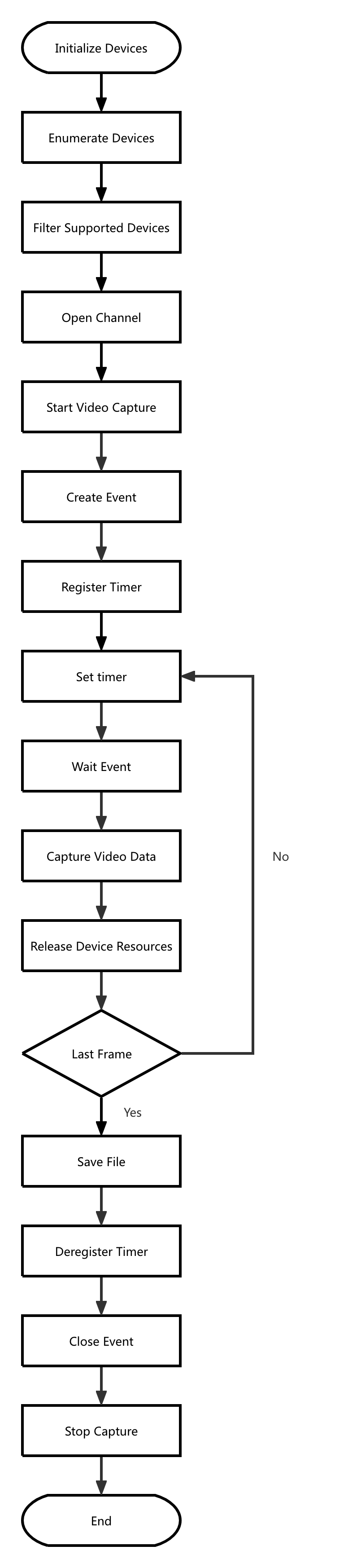
Call Logic:
- Obtain version information, initialize, and enumerate devices: MWGetVersion, MWCaptureInitInstance, MWRefreshDevice, MWGetChannelCount
- Filter supported devices based on device and interface information: MWGetChannelInfoByIndex
- Open the device:
- Open the device specified by command parameters: MWOpenChannel
- When no device is specified in command parameters, open the first available channel by default: MWGetDevicePath, MWOpenChannelByPath
- Start video capture: MWStartVideoCapture
- Create event: MWCreateEvent
- Register timer: MWRegisterTimer
- Set time schedule: MWScheduleTimer
- Wait for event: MWTryWaitEvent, MWWaitEvent
- Capture video data: MWCaptureVideoFrameToVirtualAddressEx
- Retrieve current capture status: MWGetVideoCaptureStatus
- Repeat steps 7, 8, 9, and 10 until the last frame
- Save file
- Deregister timer: MWUnregisterTimer
- Close event: MWCloseEvent
- Stop capture: MWStopVideoCapture
- Release resources: MWCloseChannel, MWCaptureExitInstance
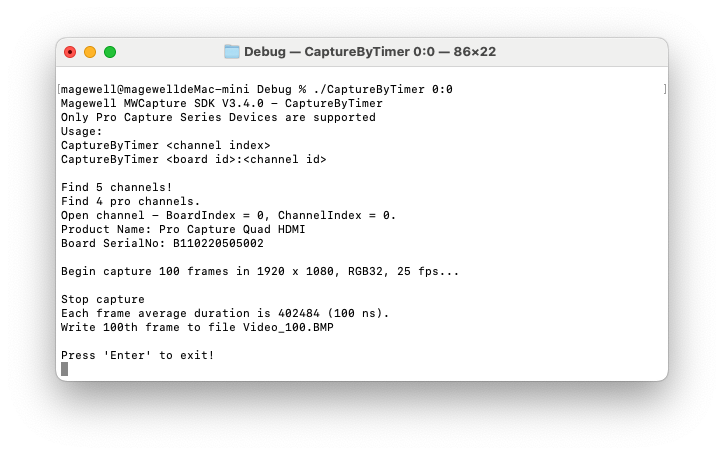
Result:
Flowchart: